Logs That Lie
observability monitoring distributed-tracing logging alerting
It’s 2:17 AM on a Thursday when the Slack messages start. Marcus, on-call SRE at a Series B payments startup, is three minutes into interrupted sleep when his phone lights up. He opens his laptop and pulls up the monitoring dashboard. Everything is green. CPU across all pods: 34%. Memory: nominal. Request rate: stable at 2,400 req/s. Database connection pool: 42 of 100 slots used. P50 latency: 180ms. By every metric on the board, the system is healthy.
The support queue has 340 open tickets. The most recent tweet at the company’s handle: “your payment system is broken, I’ve been charged twice and the order shows as failed.” Twitter has seventeen similar posts in the last forty minutes. The CTO, in a different timezone, has just posted in #incident-response: “What is happening with payments?”
Marcus opens the logs. The payment service is writing about 40,000 log lines per minute. They look like this: [2026-05-22 02:14:33] ERROR: Payment processing failed. No user ID. No order ID. No request ID. The stack trace references an internal helper method named processAsync - which exists in four different services. He searches for the affected user’s email address. Nothing. The logs don’t contain email addresses because of a privacy decision made three years ago that was never replaced with a proper pseudonymous identifier. He tries looking at the bank gateway logs. They’re on a different host. He SSHes in. The log file rotates every hour; the file from the relevant window has already been compressed and archived.
The dashboard is green because it measures the wrong things. Request rate is stable because users keep retrying - each failed payment generates three more attempts. Error rate shows 0.2% because the payment service has a try/catch block that catches the gateway timeout, logs it to a file no one reads, and returns HTTP 200 with {"status": "processing"}. The actual failure - a bank gateway returning HTTP 504 for the last 47 minutes - appears nowhere in the charts. Nobody ever wrote a metric for external gateway success rate.
This is the observability problem. You can have terabytes of data streaming past every minute and still be completely blind. Monitoring tells you whether your machines are alive. Observability is the property that lets you answer arbitrary questions about your system’s behavior - questions you didn’t know you’d need to ask when you wrote the code.
Why This Happens
Every distributed system accumulates observability debt the same way: services get added, each team picks its own logging format, alerts get bolted on after incidents rather than designed upfront, and the cumulative result is a system that generates enormous data volume without any of it being queryable in the moment that matters.
Bank gateway starts returning HTTP 504 (not monitored externally)
  → Payment service catches timeout, swallows it, returns HTTP 200
    → Error rate metric stays at 0.2% (swallowed errors don't count)
      → Dashboard stays green
        → No alert fires
          → Users retry failed payments
            → Duplicate charge attempts pile up
              → Twitter erupts, support queue fills to 340 tickets
                → On-call wakes up to: green dashboard, 340 tickets
Three antipatterns compound into total blindness. First: unstructured logging - printf-style output that humans can scan but machines cannot query or aggregate. Second: no shared request identifiers across services, so the lifecycle of a single user action scatters across twelve log files with no way to connect them. Third: alerting on infrastructure metrics - CPU, memory, pod restarts - instead of user-facing outcomes like payment success rate or checkout completion rate. Infrastructure metrics tell you the car’s engine temperature. They don’t tell you the car stopped moving.
The Naive Solution (and Where It Breaks)
The instinct is to add more logs. If you can’t find the error, clearly there aren’t enough log lines.
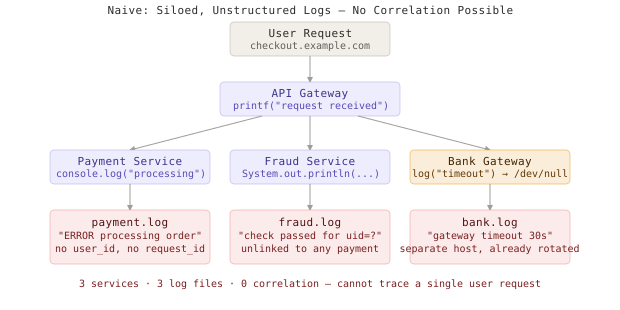
Small scale (1 service, 500 req/min):
  → open log file → Ctrl+F "ERROR" → find problem in 30 seconds

Large scale (12 services, 50,000 req/min):
  → 600,000 log lines/minute across separate files on different hosts
  → no way to link a user's request across services
  → stack traces reference methods that exist in four different repos
  → manual debugging: 2-4 hours per incident
  → P1 SLA: 30 minutes → immediate breach
The second reflex is adding more alerts. More thresholds, more PagerDuty rules, more conditions. This leads to the opposite outcome: alert fatigue. When your monitoring fires 400 alerts per day, most of them false positives or low-priority noise, engineers stop reading them. The real critical incident sits in the queue while the on-call engineer is already numb from 11 PM notifications about disk usage on a dev box. More data without structure and more alerts without signal are acceleration in the wrong direction.
Structured Logging
The first layer is also the most fundamental: every log event should be a machine-parseable JSON object, not a human-readable string.
# What most services emit
logger.error(f"Payment failed for user {user_id}: {error}")

# What makes observability possible
logger.error("payment_failed", extra={
    "event": "payment_failed",
    "user_id": user_id,
    "order_id": order_id,
    "amount_cents": amount,
    "gateway": gateway_name,
    "gateway_status_code": error.status_code,
    "duration_ms": elapsed_ms,
    "trace_id": ctx.trace_id,
})
The difference is the difference between grep and SQL. With structured logs you can ask: “Show me all payment failures from the Stripe gateway in the last 10 minutes where amount_cents exceeded 50000, grouped by gateway_status_code.” With unstructured logs, you can search for the literal string "Payment failed" and read results by eye. At 600,000 lines per minute, that’s not debugging - that’s archaeology.
Structured logging does not cost more to produce. It costs slightly more in log volume (JSON is verbose relative to plaintext) and it pays for itself the first time you debug a production incident in 4 minutes instead of 4 hours.
Correlation IDs
Correlation IDs (also called trace IDs or request IDs) are the single highest-leverage change you can make to a distributed system’s debuggability. A correlation ID is a unique identifier generated at the entry point of your system - the load balancer or API gateway - and propagated through every service that touches the same request.
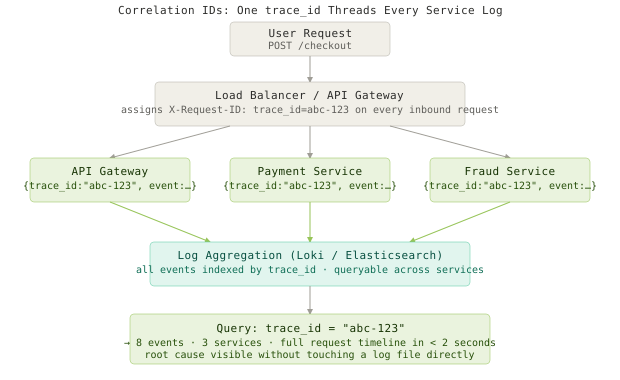
The propagation mechanism is HTTP headers. The W3C Trace Context specification defines a standard format that all OpenTelemetry SDKs implement natively:
# Single middleware class - add to every service
class TraceIDMiddleware(BaseHTTPMiddleware):
    async def dispatch(self, request, call_next):
        trace_id = (
            request.headers.get("traceparent")
            or f"00-{uuid.uuid4().hex}-{uuid.uuid4().hex[:16]}-01"
        )
        ctx.trace_id = trace_id
        response = await call_next(request)
        response.headers["traceparent"] = trace_id
        return response
Now when a user reports a failed payment, support retrieves the order_id from the ticket. You look up the trace_id stored on that order at creation time, then query your log aggregation for trace_id = "abc-123". In under ten seconds you have every log line from every service that touched that request, in chronological order. The root cause is usually visible in 90 seconds. Without correlation IDs, that same investigation takes 3 hours and sometimes never converges.
Distributed Tracing
Structured logs with correlation IDs tell you what happened. Distributed tracing tells you where time was spent. A trace is a directed tree of spans - each span represents one unit of work with a start time, duration, parent span ID, and metadata. The result is a flame graph that makes performance bottlenecks immediately visible instead of requiring hours of log correlation.
from opentelemetry import trace

tracer = trace.get_tracer("payment-service")

def process_payment(request):
    with tracer.start_as_current_span("process_payment") as root:
        root.set_attribute("user.id", request.user_id)
        root.set_attribute("payment.amount_cents", request.amount)

        with tracer.start_as_current_span("fraud_check") as fc:
            fc.set_attribute("model.version", FRAUD_MODEL_VERSION)
            result = call_fraud_service(request)

        with tracer.start_as_current_span("bank_gateway") as bg:
            bg.set_attribute("gateway.name", GATEWAY_NAME)
            return call_bank_api(request, result)
When the bank gateway timeout starts at 2:14 AM, the trace for every affected payment shows: total duration 30,200ms, of which 30,000ms is bank_gateway. The fraud check took 120ms. The database query took 40ms. The bottleneck is labeled, timestamped, and attributed - you don’t need to guess, and you don’t need to reproduce the failure to understand it.
Distributed tracing is the tool that makes latency investigations tractable. Without it, a bimodal p99 latency pattern - 200ms median, 3.2s p99 - requires hours of log-based inference to diagnose. With it, you filter traces to requests where duration > 2s, open the flame graph, and find the slow span in under a minute.
Golden Signals
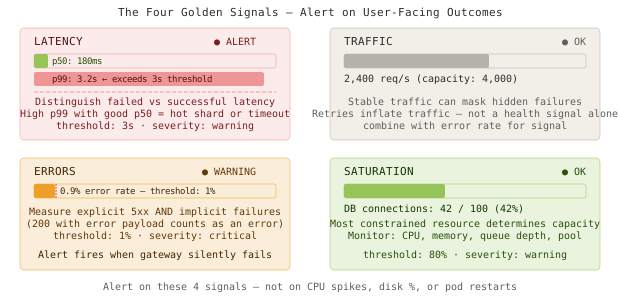
Google’s SRE book defines four golden signals - the minimum set of metrics that gives you accurate, user-facing visibility into system health regardless of what the machines are doing internally:
- Latency - how long requests take (track successful and failed latency separately; failing fast at 10ms is not a latency problem)
- Traffic - requests per second or transactions per minute (baseline for context on other signals)
- Errors - rate of explicitly failed requests plus implicit failures like a 200 with an error payload
- Saturation - how full your most constrained resource is: CPU, memory, connection pool depth, queue depth
Alert on these instead of infrastructure metrics.
# Prometheus alert rules - golden signals only
groups:
  - name: golden_signals
    rules:
      - alert: HighErrorRate
        expr: |
          rate(http_requests_total{status=~"5.."}[5m])
          / rate(http_requests_total[5m]) > 0.01
        for: 2m
        labels:
          severity: critical
        annotations:
          summary: "Error rate exceeds 1% - user-facing impact confirmed"

      - alert: HighP99Latency
        expr: |
          histogram_quantile(0.99,
            rate(http_request_duration_seconds_bucket[5m])
          ) > 3.0
        for: 5m
        labels:
          severity: warning
        annotations:
          summary: "p99 latency above 3 seconds"

      - alert: ExternalGatewayErrors
        expr: |
          rate(external_gateway_requests_total{status!="success"}[5m])
          / rate(external_gateway_requests_total[5m]) > 0.05
        for: 2m
        labels:
          severity: critical
        annotations:
          summary: "Payment gateway failure rate above 5%"
The third alert - ExternalGatewayErrors - is the one that catches the 2 AM incident. The bank gateway failure rate was 100% for 47 minutes. No alert fired because nobody wrote that metric. ExternalGatewayErrors measures a user-facing outcome directly and would have paged Marcus at 2:14:02 AM instead of 2:17 AM via Twitter.
Synthetic Monitoring
All of the above - structured logs, correlation IDs, traces, golden signals - fires only after real users are affected. Synthetic monitoring inverts this: it proactively simulates complete user flows from outside your production infrastructure on a schedule, and alerts when those simulations fail.
A synthetic payment flow runs every 60 seconds from three geographic regions. It authenticates as a dedicated test user, creates an order for a sentinel SKU, processes a payment through the gateway’s test mode, and verifies the expected confirmation state. If any step fails or exceeds its latency SLO, an alert fires before any real user is affected.
def synthetic_checkout_flow(region: str) -> SyntheticResult:
    start = time.monotonic()
    try:
        session = api.login(SYNTHETIC_USER, SYNTHETIC_PASS)
        assert session.status_code == 200, f"Login failed: {session.status_code}"

        order = api.create_order(session, SYNTHETIC_SKU, qty=1)
        assert order.get("id"), "Order creation returned no ID"

        payment = api.pay(session, order["id"], SYNTHETIC_TEST_CARD)
        assert payment.get("status") == "success", (
            f"Payment returned unexpected status: {payment.get('status')}"
        )

        duration_ms = (time.monotonic() - start) * 1000
        metrics.gauge("synthetic.checkout.duration_ms", duration_ms, tags={"region": region})
        return SyntheticResult(success=True, duration_ms=duration_ms)

    except AssertionError as exc:
        metrics.increment("synthetic.checkout.failure", tags={"region": region})
        alerts.fire("SyntheticCheckoutFailed", str(exc), severity="critical")
        return SyntheticResult(success=False, error=str(exc))
At 2:14 AM, when the bank gateway starts timing out, the synthetic check fails at assert payment.get("status") == "success". At 2:14:47 AM - 47 seconds into the incident - PagerDuty pages Marcus. Compare this to the actual timeline where he woke to 340 support tickets at 2:17 AM because a teammate noticed the Twitter thread. The synthetic check shaved 2+ hours off the incident response, not 3 minutes.
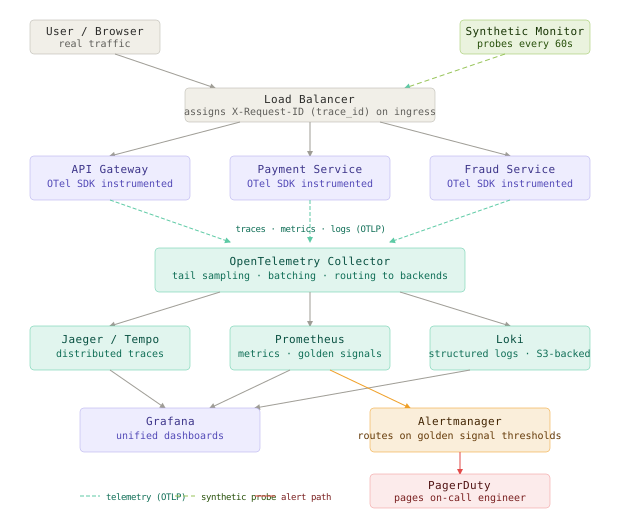
The Full Architecture
OpenTelemetry Collector
The OpenTelemetry Collector is the backbone of a vendor-neutral observability pipeline. It receives traces, metrics, and logs from services over OTLP, applies processors (sampling, batching, enrichment), and routes to multiple backends without touching application code.
# otel-collector-config.yaml
receivers:
  otlp:
    protocols:
      grpc:
        endpoint: 0.0.0.0:4317
      http:
        endpoint: 0.0.0.0:4318

processors:
  batch:
    timeout: 5s
    send_batch_size: 1000
  tail_sampling:
    decision_wait: 10s
    policies:
      - name: errors-policy
        type: status_code
        status_code: {status_codes: [ERROR]}
      - name: slow-traces
        type: latency
        latency: {threshold_ms: 2000}
      - name: probabilistic-base
        type: probabilistic
        probabilistic: {sampling_percentage: 10}

exporters:
  otlp/jaeger:
    endpoint: jaeger-collector:4317
  prometheus:
    endpoint: "0.0.0.0:8889"
  loki:
    endpoint: http://loki:3100/loki/api/v1/push

service:
  pipelines:
    traces:
      receivers: [otlp]
      processors: [tail_sampling, batch]
      exporters: [otlp/jaeger]
    metrics:
      receivers: [otlp]
      processors: [batch]
      exporters: [prometheus]
    logs:
      receivers: [otlp]
      processors: [batch]
      exporters: [loki]
The tail_sampling processor is the key to cost control. It makes sampling decisions after seeing the complete trace - so it can keep 100% of traces that contain errors or latency outliers and sample only 10% of everything else. Head-based sampling (flipping a coin at trace start) discards errors randomly; tail-based sampling never discards an error trace.
Log Aggregation
Two dominant choices: Elasticsearch offers powerful full-text search and can index every field without upfront declaration, at significant cost. Grafana Loki stores only declared label keys as indexes and keeps raw log content in object storage like S3, making it dramatically cheaper at scale. At 100GB/day of log volume, Loki on S3 runs roughly $80/month. Elasticsearch at the same volume runs $1,200-2,000/month depending on retention.
The tradeoff: Elasticsearch can answer ad-hoc queries on any field instantly. Loki requires scanning raw content for fields not declared as labels, which is slower for exploratory queries. For production incident response - where you’re searching by trace_id, user_id, or event - Loki is fast enough and the cost savings are real.
The Synthetic Monitor
Run synthetic checks from a location genuinely external to your production infrastructure - a separate cloud account, a monitoring SaaS, or a cron job on a different VPS. If the check runs inside your production VPC, it bypasses the load balancer, the CDN, and the DNS resolution that real users traverse. A synthetic check that lives inside your VPC can pass even when the site is completely down for users. That’s not monitoring - it’s theater.
Approach Comparison
| Approach | Write Complexity | Debug Speed | Alert Quality | Storage Cost | Failure Modes | Best For |
|---|---|---|---|---|---|---|
| Unstructured logs | None | Slow (grep) | None | Low | Completely dark at scale | Local development only |
| Structured logs | Low | Fast (query) | None | Medium | No request correlation | Any production service baseline |
| Structured + correlation IDs | Low | Very fast (trace lookup) | None | Medium | Cannot see latency distribution | Multi-service architectures |
| Distributed tracing (OTel) | Medium | Instant (flame graph) | None | High (mitigated by sampling) | Complex initial setup | Latency investigations, 6+ services |
| Golden signal alerts | High (alert design) | Proactive | Excellent | Low | Misses outlier failure modes | Production SLO enforcement |
| Synthetic monitoring | Medium | Proactive | Excellent | Minimal | Only catches flows you simulate | Customer-critical paths |
| Full observability stack | High | Instant + proactive | Excellent | Medium-High | Requires operational investment | Any serious production system |
Key Takeaways
- Structured logging transforms log output from human-readable noise into machine-queryable events - every subsequent layer of observability is built on this foundation and collapses without it.
- Correlation IDs are the highest-leverage single change you can make to a distributed system’s debuggability; a shared
trace_idturns 47 separate log files into one coherent request timeline. - Distributed tracing answers not just what failed but where time was spent - the flame graph makes latency bottlenecks that would take hours to find from logs take seconds from a trace view.
- Golden signals (latency, traffic, errors, saturation) are the minimum metric surface area that gives you true user-facing visibility, entirely distinct from infrastructure health metrics.
- Synthetic monitoring is the only form of monitoring that catches problems before real users do - it inverts the reactive model and makes Twitter the backup alert channel, not the primary one.
- Alert on symptoms, not causes - “payment success rate dropped below 95% for 3 minutes” wakes someone up for the right reason; “CPU at 82%” almost never does.
- Dashboard metrics lie when they measure infrastructure health instead of user-facing outcomes - a green dashboard with 340 support tickets is the canonical form of this mismatch.
- Tail-based sampling solves the observability cost problem without sacrificing signal: keep 100% of error traces and latency outliers, sample 10% of everything else, and trace storage stays tractable at any scale.
The hardest part of observability isn’t the tooling. Every major cloud provider has a managed Jaeger, a Grafana, and a Loki setup you can provision in an afternoon. The hard part is making the case for two engineering weeks on structured logging and correlation IDs before the incident that makes it obvious why you needed them. Build your system to be queryable by an engineer who has never seen the codebase, at 3 AM, with no context and a ticking SLA clock. If that person can open a trace ID and understand the complete request lifecycle in under two minutes, you’ve built something that will survive the next outage with your dignity intact.
Frequently Asked Questions
Q: Do I need all five layers, or can I start smaller?
A: Start with structured logging and correlation IDs - together they unlock roughly 80% of the debugging value with about 20% of the total effort. Distributed tracing pays off meaningfully only once you have 6+ services and latency problems you can’t explain from logs alone. Synthetic monitoring is non-negotiable for any checkout, payment, or auth flow - the investment is small and it will pay for itself the first time it fires before your users do.
Q: OpenTelemetry vs. a proprietary APM like Datadog or New Relic - which should I use?
A: OpenTelemetry is the instrumentation layer - what you put in your code. Datadog and New Relic are backends that accept OTLP. If you instrument with OTel today, you can send to Datadog now and switch to Grafana next year without touching application code. The hosted APMs offer better UX and ML-based anomaly detection but at 10-100x the cost of self-hosted alternatives. Instrument with OTel regardless of which backend you choose - the interoperability is the point.
Q: How do correlation IDs work across a polyglot microservices environment?
A: Use the W3C Trace Context standard - specifically the traceparent HTTP header. Every language’s OpenTelemetry SDK implements this format natively. The ID is generated at your ingress and every SDK automatically reads it from inbound headers, creates a child span, and forwards it on all outbound HTTP and gRPC calls. You write zero custom propagation code - just initialize the OTel SDK in each service.
Q: How expensive is distributed tracing at high throughput?
A: At 10,000 req/s with 10 spans per request, you’re generating 100,000 spans per second without sampling. With tail-based sampling at 10% of happy-path traces and 100% of error traces, you store roughly 12,000 spans/s. That’s approximately 1TB/month at typical compression. Using Jaeger with an S3 backend, that’s under $30/month in storage costs - the collector CPU overhead for sampling is minimal and the economics are favorable at any scale.
Q: My service logs 50,000 lines per minute. How do I avoid drowning in data?
A: Log level sampling at the pipeline level, not in the application. Keep 100% of ERROR and CRITICAL, 10% of WARN, 1% of INFO for high-volume services. Structured fields make this precise - you can keep 100% of events where event=payment_failed and 0.01% of events where event=health_check_ok. Apply this sampling in the OTel Collector processor, not in application code, so you can temporarily disable it during an incident to get full fidelity.
Q: What distinguishes a good synthetic check from a useless one?
A: A good synthetic check exercises a complete user-facing flow end-to-end using real public endpoints, runs from outside your production VPC, uses the payment gateway’s test mode, and covers at least authentication, the critical action, and the confirmation state. A useless synthetic check pings /health and declares victory. A health endpoint returning 200 is not the same as a user successfully completing a payment - the gateway, the fraud service, and the confirmation email can all fail while /health is green.
Interview Questions
Q: Your company has 15 microservices. A customer reports a failed payment with a timestamp. Walk me through exactly how you’d find the root cause in under 5 minutes.
Expected depth: Retrieve the trace_id associated with the customer’s order_id from the orders table (stored at order creation time). Query the log aggregation system for all events where trace_id = X ordered by timestamp - this reconstructs the complete request lifecycle across all services. Identify which span carries a non-success status code or the longest duration in the trace waterfall. Cross-reference with the golden signal dashboard for that service at that timestamp to determine if it’s systemic or isolated. Check whether the synthetic monitor was failing concurrently - if yes, the failure is systemic and started at the synthetic failure timestamp; if no, dig into the user-specific trace for edge-case causes.
Q: Explain the difference between monitoring and observability. Why does the distinction matter in practice?
Expected depth: Monitoring is checking known failure modes against known thresholds - “is disk usage above 90%?” Observability is a property of the system itself: the ability to ask arbitrary questions about internal state from external outputs, without modifying code. The three pillars are logs (discrete events), metrics (aggregates over time), and traces (causality across service boundaries). The practical difference: a monitored system can only detect failures you anticipated when you wrote the alerts. An observable system lets you debug a failure mode you’ve never encountered before. The 2 AM scenario - green dashboard, 340 tickets - is what a monitored but non-observable system looks like in production.
Q: How would you implement distributed tracing in a system spanning 20 services across 4 programming languages?
Expected depth: Use OpenTelemetry - it has SDKs for Python, Go, Java, Node, Ruby, and others that all implement the W3C Trace Context propagation standard. The OTel Collector centralizes telemetry regardless of language. Each service initializes the OTel SDK, which auto-instruments HTTP and gRPC clients to propagate traceparent. Custom business spans use the tracer API directly. The collector handles sampling, batching, and routing. Critically: use tail_sampling at the collector rather than head_sampling so you can base sampling decisions on the complete trace outcome - error traces always get sampled, healthy traces get sampled probabilistically.
Q: Your p99 latency is 4.2 seconds but p50 is 190ms. What does this pattern indicate and how do you investigate?
Expected depth: Bimodal latency distribution is the fingerprint of “slow for some requests, not all.” Common causes: cache miss on cold requests while warm requests are sub-100ms; hot shard or hot row causing lock contention for specific key ranges; a timeout value causing some requests to wait 30 seconds before failing. Investigation: filter distributed traces to requests where duration > 2s. Look at which span is slow in those traces compared to fast-path traces for the same endpoint. Check saturation metrics - is the slow path hitting an overloaded resource? Correlation IDs let you retrieve specific slow traces on demand; the trace flame graph identifies the exact span introducing the latency within seconds.
Q: How would you design synthetic monitoring for a checkout flow without touching real user data or triggering real payments?
Expected depth: Create a dedicated synthetic user account flagged in the database (is_synthetic: true). Filter this account from all business metrics at the query layer. At the payment step, use the payment gateway’s sandbox mode with a designated test card number - this exercises your full payment code path including fraud checks without hitting real bank processing. Run the synthetic runner from infrastructure external to your production VPC (a separate cloud account or monitoring SaaS) so it traverses the same load balancers, CDN, and DNS resolution real users use. Emit results to your metrics pipeline with a synthetic=true label for dashboard isolation. Run checks from at least two geographic regions to catch regional failures, and emit a metric - not just an alert - so you can graph synthetic check success rate over time and see degradation trends before thresholds are breached.